I live in Italy and volunteer for an association that works with disabled people and teaches them how to play music.
Sometimes we have peculiar situations that require a fancy way of connecting the instrument and the headphones monitor, so that it can be very time consuming setting up the musician and the instrument.
If we can switch to wireless this problem can be reduced very much.
What I am trying to achieve is to have 8 aux track in a logic project, each of them going in a different output of a virtual device (I am using blackhole 16ch). This 8 channel I want to send them via wifi to 8 different raspberry pi zero W.
For now I installed jack and jacktrip on both my mac (OS 13) and raspberry pi zero w (OS trixie)
I started a server on the mac using
jacktrip -S -n 8 -B 5000
And on the RPi
jackd -d dummy -r 48000 -p 1024 -P 4 &
jacktrip -c -n 8 -D
And I am trying to record something in input on the pi with jack_capture. But everything is silent.
Can you help me figure out what I am doing wrong?
If I record the output of blackhole I get some audio so I think the device is correctly sending audio.
There are just a few on this Forum using the Pi with JackTrip and even fewer using command line but I do have some thoughts and info.
Have you checked that the JackTrip version and JACK audio settings (sample rate, buffer size) are compatible between the server and all clients?
Did you open qjackctl’s “Connect” window and drag connections from your hardware inputs to JackTrip’s inputs and JackTrip’s outputs to your hardware outputs?
Are you connecting several clients to the same server in hub mode? If so, I see the -p flag for patching on the client side but not for the server.
A lot more info can be found in an online search (google) and I have included a few key points below.
Please keep us posted!
Key JackTrip Patching Commands (Audio Routing)
These options configure how audio flows on the hub server:
-p <#> or --hubpatch <#>: Sets the audio patching mode (0-5).
0: Server sends audio to clients (default).
1: Client loopback (hear yourself).
2: Client fan-out/in (server mixes, no loopback).
4: Full mix (server mixes all, includes loopback).
-i or --includeserver: Include server’s audio in mixes for modes 2 and 4.
-u or --upmix: Upmix mono clients to stereo.
Example:jacktrip -S -p 4 (Starts a hub server with a full mix, including loopback).
on closer look at your commands I see that you have a capital S for the server, which indicates hub mode, but you have small c for the client which indicates peer-to-peer.
A client connecting to a hub server would need a capital -C.
Hi synthia.
In the next few days I will tell you what I tried, for now, I don’t have clear the difference between hub (capital S and C) and standard (lower case s and c). Can you explain me that?
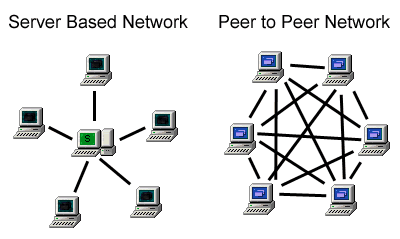
The Capital -C (Clients) and -S (Server) flags are for a Hub Server, also known as a “Server Based Network”, where all Clients connect to a single Server that facilitates all connections between Clients. The Hub Server machine is a “many-to-one” configuration and needs to have adequate resources to host all of the Clients in the session.
The small -c (clients) and -s (server) configuration also known as a peer-to-peer (p2p) was designed for one-to-one and a smaller number of connections where each client is physically connected to every other client. Theoretically, each client machine “hosts” every other client in the session and would need to have the resources for it.
Now what is bothering me is that I have an aggregated device that include a blackhole 16CH (16 in and 16out) and the built-in output (2ch). In total I should have 18 outs and 16 ins.
as you can see I have 18 playback and 16 captures (that is ok with my 16 in and 18 out aggregated device), the problem is that the only way I have to send audio to the RPi is doing: